Navigation
Vault access. Public access is not open. This product is separate from initial Identity and Apparatus access.
Screenshots use fictional demonstration accounts. Your data and available actions may differ. Reviewed October 16, 2026.
Start here
Read the Vault overview
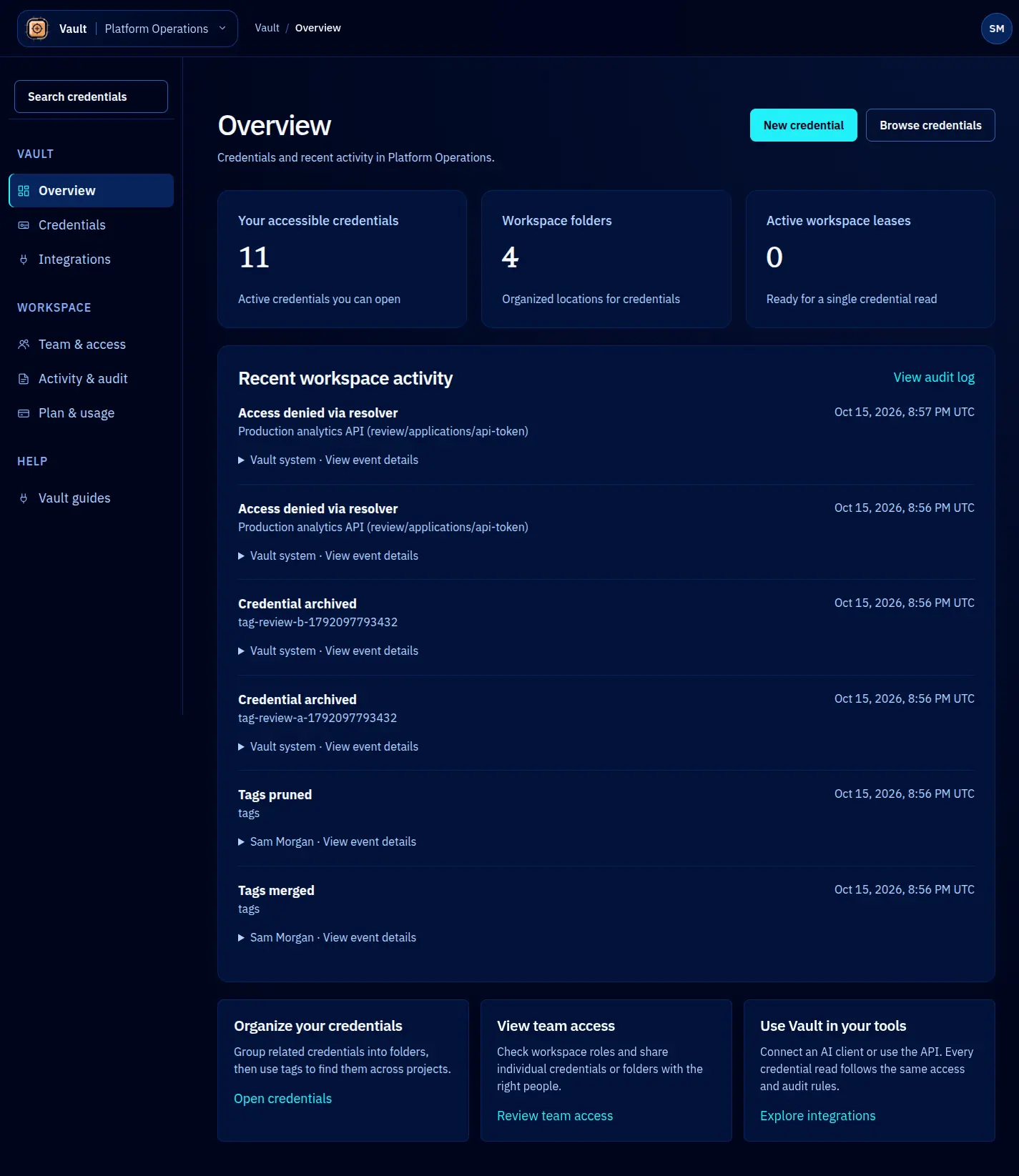
Use Overview to orient yourself before opening a credential or reviewing recent activity.
Read the counts
Your accessible credentials reflects your effective access, including applicable folder grants. It is not necessarily the total number stored in the workspace. Workspace lease and usage figures describe a different scope; read the label beneath each number before comparing them.
A zero credential count can mean that no records have been shared with you. Ask an owner to check the intended credential or folder grant rather than creating duplicates. A read-only member may be able to use an explicitly shared record while having no permission to create one.
Continue your work
Open Credentials to browse folders or use Search credentials for a known name, key or description. Use New credential when your role permits creation. Recent activity names the affected record where it can be resolved and includes the time and actor. Open Activity & audit for event filters and technical details.
Plan allowances and billing belong in Plan & usage, which is restricted to owners and platform operators. A usage total is not a bill or a provider charge.
Screen reference