Navigation
Vault access. Public access is not open. This product is separate from initial Identity and Apparatus access.
Screenshots use fictional demonstration accounts. Your data and available actions may differ. Reviewed October 16, 2026.
Access and maintenance
Review activity and audit records
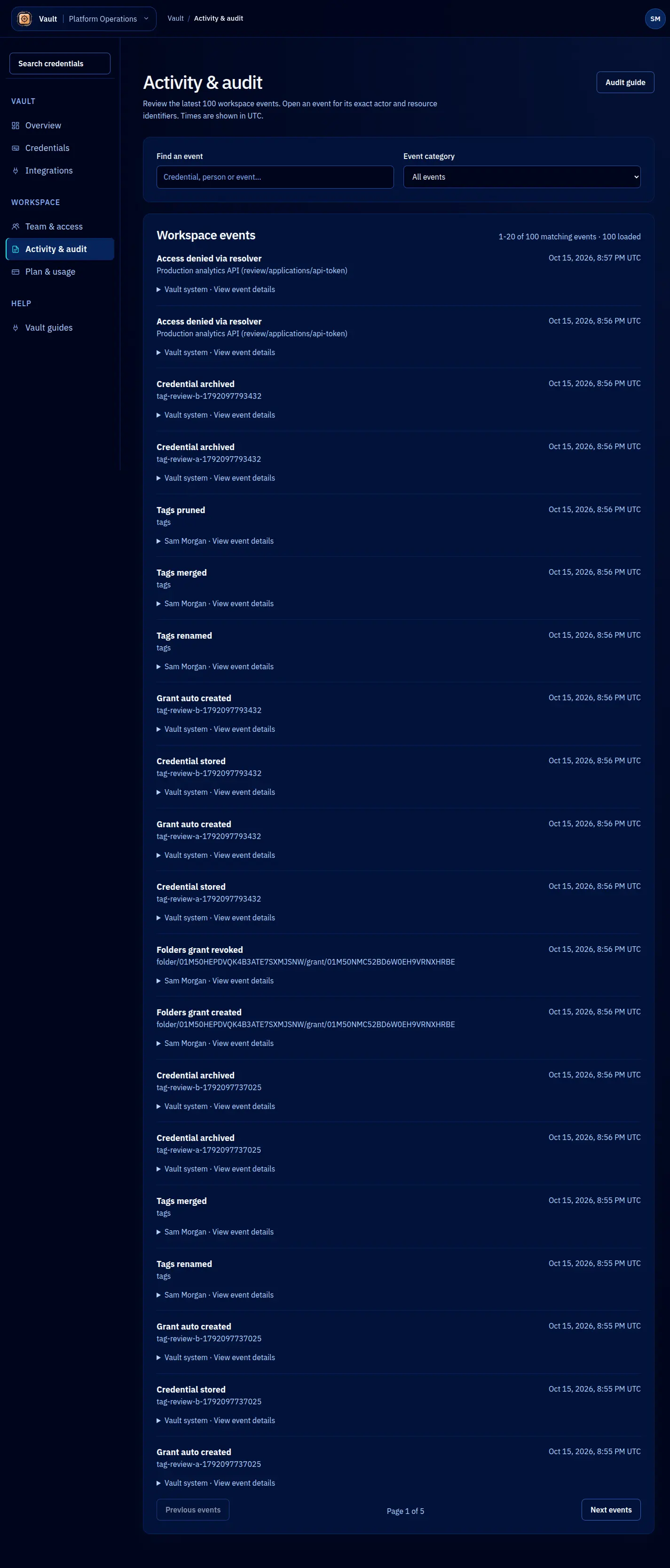
Open Activity & audit for workspace events. The console loads the latest 100 events and shows 20 at a time. Search and category filters apply to that loaded set; this is not a search across unlimited history.
Investigate an event
- Use a category to narrow the kind of action, or search the loaded events by their displayed information.
- Read the action, actor, record and time together. A successful metadata read is different from a secret read.
- Expand an event for technical identifiers and payload details. Preserve the event or correlation ID when reporting a problem; do not paste secret values into a support message.
- Use the page controls to move through results. Clear filters if the list becomes empty.
To investigate one credential, open its Activity tab. It combines relevant events with lease status. Expired, Consumed and Revoked describe different outcomes. Revoke an unused lease when it is no longer needed.
Export and retention
Audit export requires both a plan that includes it and a configured export service. Plan entitlement alone does not establish availability. If export is unavailable, ask an administrator to check configuration; there is no reason to repeatedly submit the same request.
Audit history is append-only through the application and uses a tenant hash chain. It helps investigate actions; it does not prove that a consuming client kept plaintext out of its own logs. See the audit reference and security boundaries.
Screen reference