Navigation
Prospector access. Public access is not open. This product is separate from initial Identity and Apparatus access.
Screenshots use fictional demonstration accounts. Your data and available actions may differ. Reviewed October 15, 2026.
Configure
Set up your professional profile
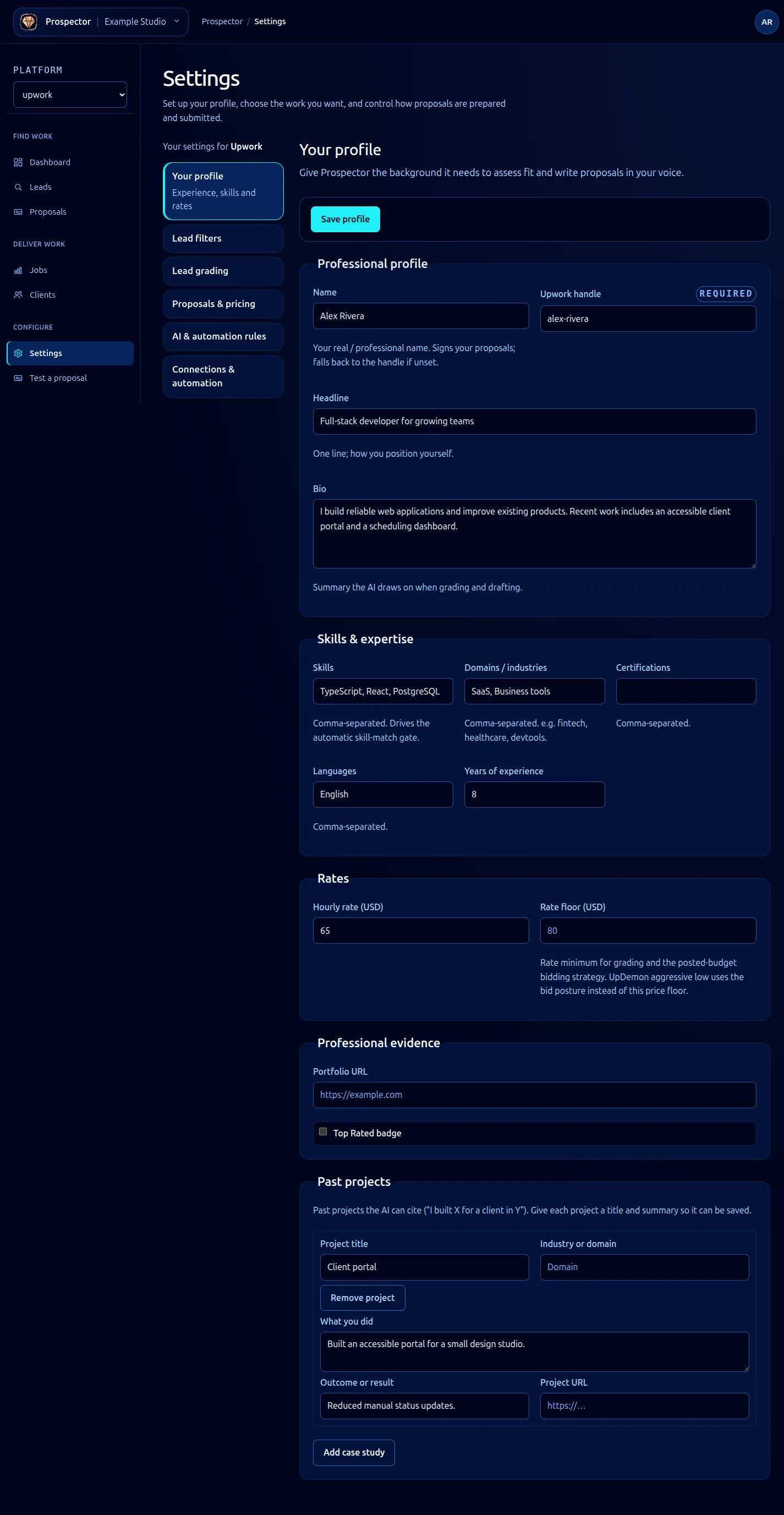
Open Settings → Your profile for the selected platform. Use accurate facts you want Prospector to draw on.
- Complete Professional profile: name, required Upwork handle, headline and bio. Your name can be used to sign proposals.
- Under Skills & expertise, enter comma-separated skills, domains, certifications and languages, plus years of experience. Skills also inform the automatic skill-match filter.
- Set Hourly rate (USD), Rate floor (USD), portfolio URL and the badge option that applies to you. The rate floor has a different role from the pipeline’s minimum job value.
- Under Past projects, select Add case study and provide a title and What you did. Add domain, outcome and URL when available. Remove project removes an unsaved row from the form.
- Select Save profile, wait for success and reload when you want to verify the persisted values.
If validation fails, correct the indicated field and save again. Your entered values remain available after a correctable server error. Do not navigate away before saving changes you want to keep.
Past projects should support claims the writer can truthfully make. Then configure writing style and pricing and run a deliberate proposal test.
What it looks like