Navigation
Screenshots show the released Identity interface with fictional demonstration accounts. Reviewed October 15, 2026.
Your account
Edit your profile and email
Where: choose Profile in the sidebar, or Manage account from your avatar menu.
Change your display name
- In Profile, edit Display name.
- Select Save in that section.
- Check the saved result. This is the name shown to teammates and operators; it does not change your sign-in email.
Change your email address
For an account with an email/password sign-in method:
- In Email, check the current address.
- Enter New email and Current password.
- Select Send verification to new email.
- Open the verification message at the new address and use its link within one hour.
- Complete the confirmation, then use the new address when signing in.
Identity also notifies the current address so the change can be cancelled if you did not request it. Use the cancellation link promptly if the request was unexpected.
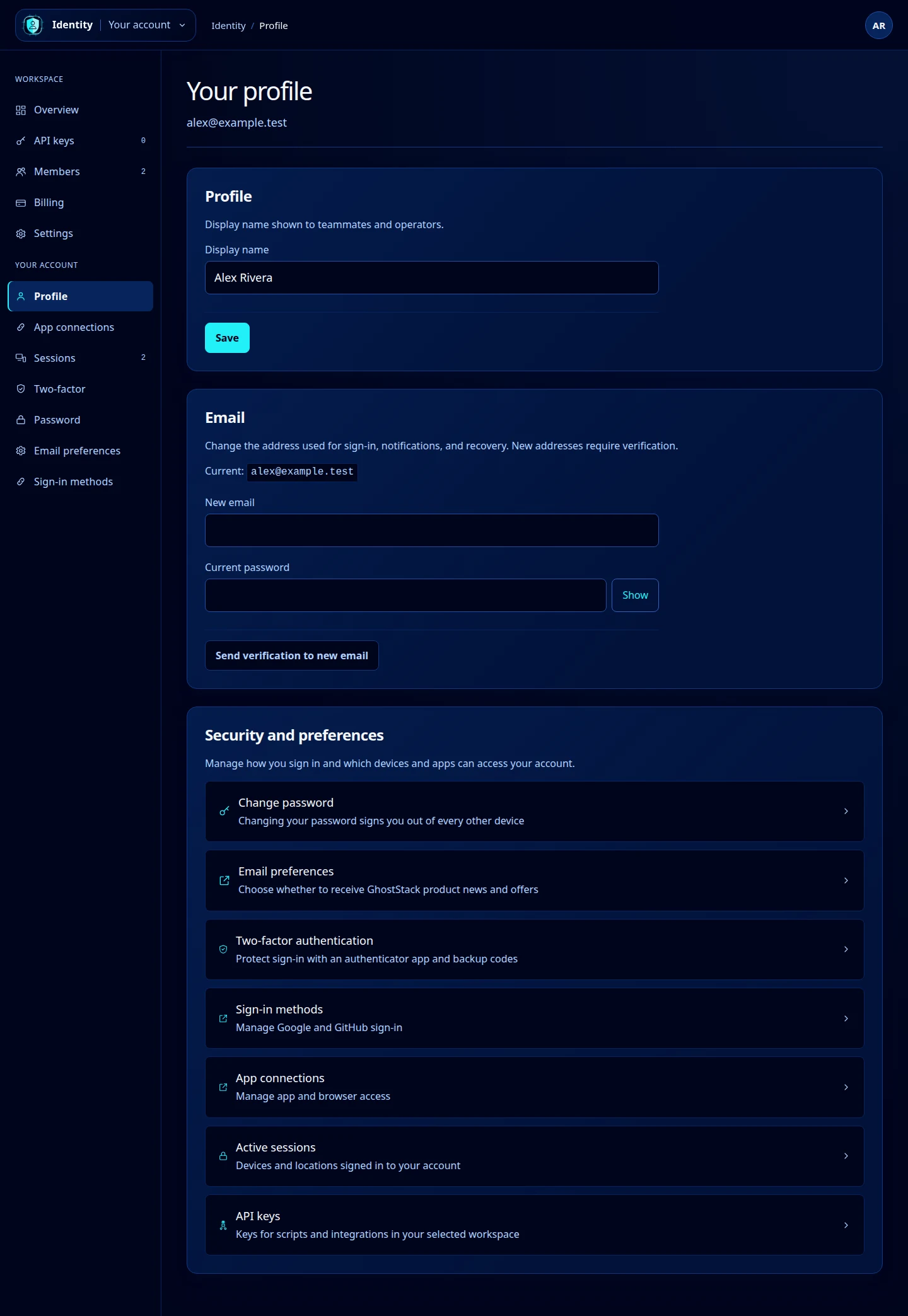
Open this screenshot at full size.
If the email form is unavailable
Accounts that sign in only through Google or GitHub cannot change their email from this page. Review Sign-in methods. Do not create another account just to change the display name.
If the new email is already in use, choose a different address or recover the existing account. If the verification link expires, submit a new request. Changing a workspace’s contact email is a separate task under Workspace settings.